
Customize Your CRM with Rename Standard Objects
How It Works
Your CRM should speak your business language — and now it can.
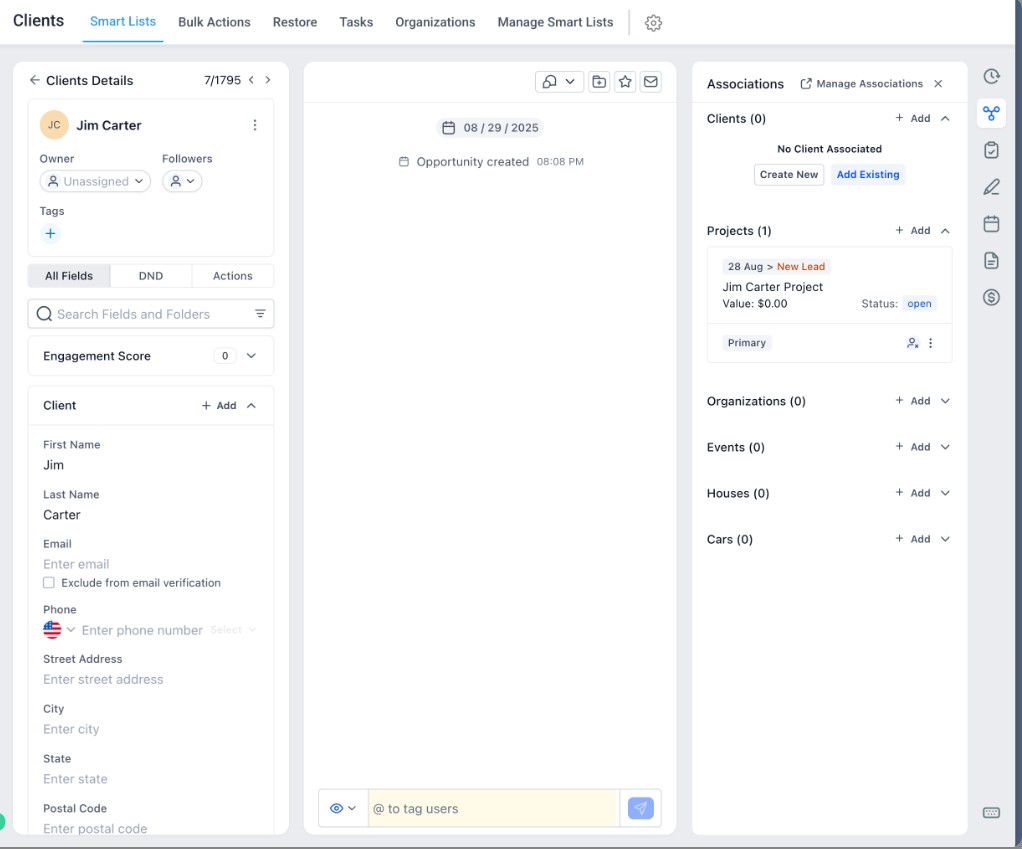
Gold Star Pro’s latest update lets you rename standard CRM objects like Contacts, Companies, and Opportunities to fit your preferred terminology. Whether you call them Clients, Projects, Deals, or Accounts, you can now tailor your CRM interface to match how your team actually works.
Once renamed, these new labels automatically appear across navigation menus, reports, filters, and dashboards — instantly updating the entire system for a consistent, customized experience.


How to Use
Go to Settings → CRM → Rename Objects.
Select the object you want to rename — Contacts, Companies, or Opportunities.
Enter both Singular and Plural names (up to 50 characters each).
Save your changes.
Your new object names will appear everywhere — in menus, reports, and filters — without affecting backend data or workflows.

Why This Matters
Every business uses its own terms for customers, deals, and data — but until now, you had to adapt to the platform’s default labels.
With Rename Standard Objects, you can:
Personalize Your CRM: Use familiar terms your team already understands.
Simplify Training: Reduce confusion by matching system labels to your processes.
Create Consistency: Keep language uniform across all users and departments.
Improve Adoption: Help your team feel more at home in the system.
It’s a simple but powerful way to make your CRM truly yours — flexible, familiar, and fully aligned with how your business communicates.
Use Cases
Agencies: Rename Contacts to Clients and Opportunities to Projects.
Real Estate Teams: Change Companies to Properties or Listings.
Service Businesses: Rebrand Opportunities as Jobs or Contracts.
B2B Organizations: Rename Contacts to Accounts or Vendors.
Gold Star Pro’s Rename Standard Objects feature gives you more control over your CRM setup — keeping everything clear, consistent, and aligned with your business language.
